
Microsoft 365 Copilot · package 1.0.2
Submitting ChargingNear.me to the Microsoft 365 Copilot Agent Store
A declarative agent whose one action is our MCP server’s public tools. No sign-in, no OAuth and no domain verification. Version 1.0.2 answers Teams validation ticket #5936429. Three steps: download the package, update the offer in Partner Center, and paste the copy, screenshots and video below.
1. Download the package
chargingnearme-m365-agent-1.0.2.zip (12,344 bytes, SHA-256 3d0f94b4a15cd5b59b501a501df719eb9f275029dcaf464a1e646f7d54d9f234). It holds five files at its root, each checked against Microsoft's schemas:


App manifest 1.30, declarative agent 1.9, plugin manifest 2.4. One runtime: the remote MCP server https://chargingnear.me/api/mcp with no sign-in, carrying the 12 public tools copied from its tools/list. Developer name Wins Parking, as in Partner Center. App ID a69d1386-c369-4262-aac7-b89fbb9d88d0; raise the version for every resubmission. Sign-in to the account tools comes in version 1.1.0.
2. Create the offer in Partner Center
- Wait for Microsoft’s OK. Microsoft asked us not to resubmit until it approves the fixes on the validation email thread.
- Sign in to Partner Center as the publisher Wins Parking (ID 7189942), then Marketplace offers → + New offer → Apps and agents for Microsoft 365 and Copilot. Offer name: ChargingNear.me.
- Product setup / Properties: category Productivity (or Travel and transportation), industries Automotive and Transportation; legal: standard contract or the terms link below.
- Offer listing: paste the copy from step 3, upload the five screenshots below (1366×768 PNG) and add the YouTube video link.
- Technical configuration: upload the zip from step 1.
- Notes for certification: paste the notes from step 3. No test account is needed: every tool in this version is public.
- Publisher attestation: answer as in Publisher attestation below.
- Review and publish. Microsoft emails the result; fixes go in a new package version. Do not add a domain verification file unless Partner Center asks for one.
3. Listing copy, screenshots and certification notes
| Name | ChargingNear.me |
|---|---|
| Full name | ChargingNear.me: U.S. EV charging stations |
| Short description | NEVI checks, highway charging gaps and every public U.S. EV charger, cited. (75/80) |
| Long description | ChargingNear.me adds structured U.S. electric vehicle (EV) charging data and federal compliance checks to Microsoft 365 Copilot. It is one of the agents for Microsoft Copilot. One structured catalog of every public U.S. charger, read daily from the U.S. Department of Energy Station Locator. That is 58,518 charging locations with 274,370 ports across all 50 states and DC (November 23, 2026). Answers come from this data, not from web pages. Federal NEVI checks for each station: four CCS ports at 150 kW within 1 mile of a designated corridor. Each check gives the reason a station fails and cites the rule (23 CFR 680.106). Highway charging gaps over 50 miles, each with its start and end mile markers: stretches of highway with no fast charger within 5 miles of the highway, measured in a straight line. That is 852 stretches nationally (November 23, 2026), from ChargingNear.me's daily open data under CC BY 4.0. Corridor coverage against the 50-mile rule, per state and highway: the miles and the share of each designated corridor that meet it. Every answer carries a dated, citable source link. Ask Copilot which DC fast chargers on a highway meet NEVI and why the others fail, where the fast-charging gaps are on a highway, how much of a corridor meets the 50-mile rule, for DC fast charging stops on a drive, or for charging numbers for a city, a state or the whole country. Each station comes with its address, network, charging speed and connectors, and a link to its page on chargingnear.me. The agent is free, needs no sign-in and reads public data only. Coverage is the United States. It does not reserve or start a charge, take payments or give turn-by-turn directions. [Get started](https://chargingnear.me/mcp/microsoft-365-copilot) [Help and FAQ](https://chargingnear.me/support) [Contact us](https://chargingnear.me/contact) [Sign up for chargingnear.me (free, optional)](https://chargingnear.me/sign-in) (1931/4000) |
| Features |
|
| Privacy policy | https://chargingnear.me/privacy#mcp-and-ai-agents |
| Terms of use | https://chargingnear.me/terms#mcp-and-ai-agents |
| Support | api@chargingnear.me · https://chargingnear.me |
| Get started | https://chargingnear.me/mcp/microsoft-365-copilot |
| Help and FAQ | https://chargingnear.me/support |
| Contact us | https://chargingnear.me/contact |
| Sign up for chargingnear.me (free, optional) | https://chargingnear.me/sign-in |
| Video | https://youtu.be/Bdb9p79huXY (Unlisted, on the ChargingNearMe YouTube channel): paste this link in Partner Center. The same video on our site: https://chargingnear.me/mcp/store-kit/microsoft-365/demo.mp4 (53 s, 1920×1080 MP4, captions in the picture). |
| Icons | Color 192×192 and outline 32×32 (white on transparent), both inside the zip. |

Screenshots
Five 1366×768 PNGs, one per feature: mockups of Copilot chat in Teams with the agent, built from real answers of the MCP server, each with a caption naming the feature. Stable addresses:
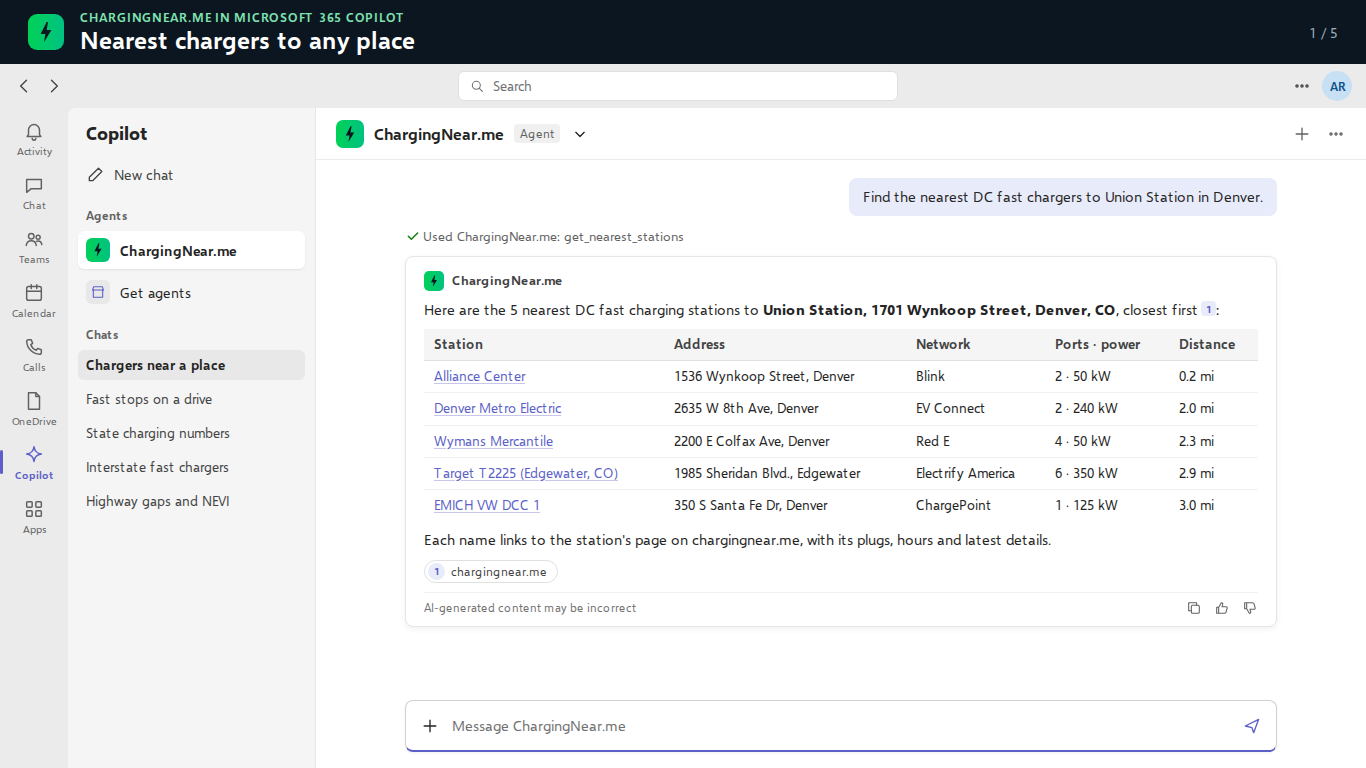
Microsoft 365 Copilot in Teams lists the five nearest DC fast chargers to Union Station, Denver.
https://chargingnear.me/media/store/chargingnearme-m365-copilot-1-nearest-chargers-1366x768-v2.png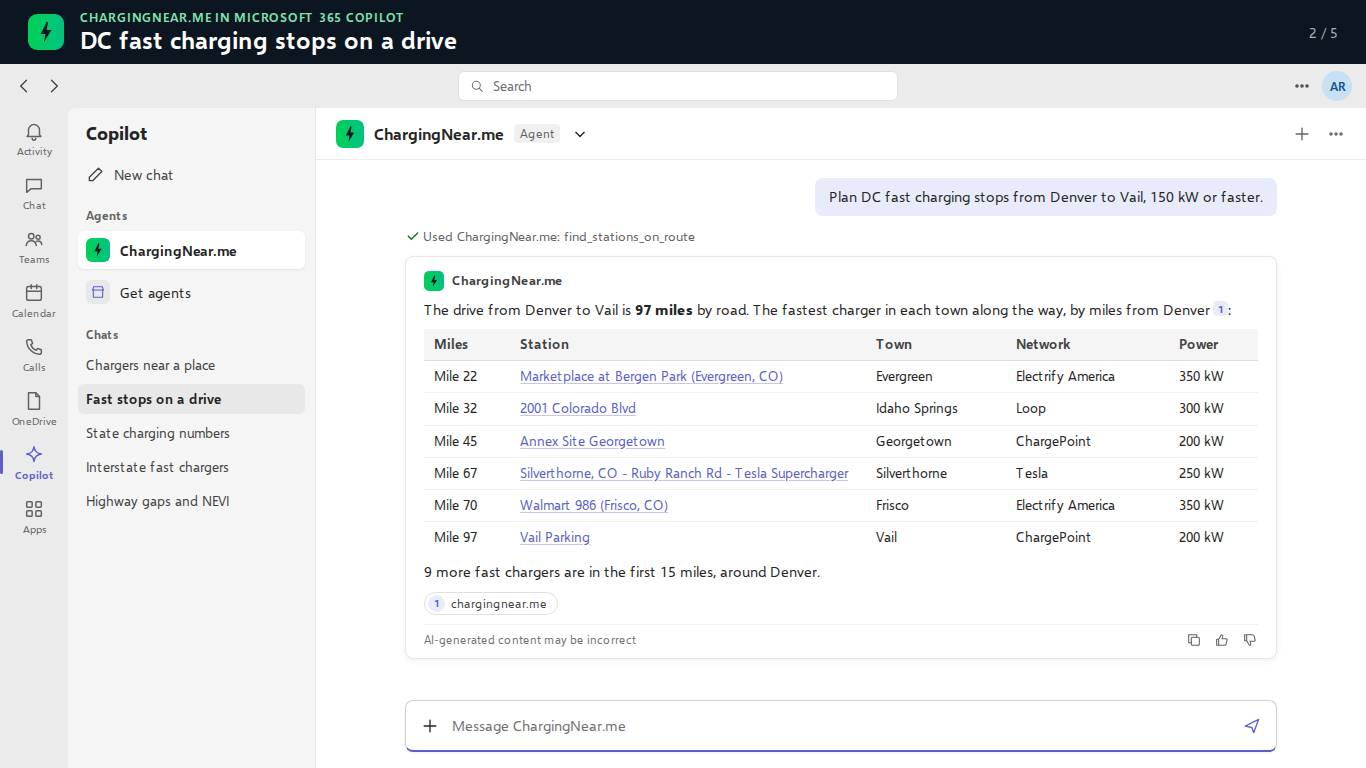
Microsoft 365 Copilot in Teams lists fast chargers along the drive from Denver to Vail.
https://chargingnear.me/media/store/chargingnearme-m365-copilot-2-drive-stops-1366x768-v2.png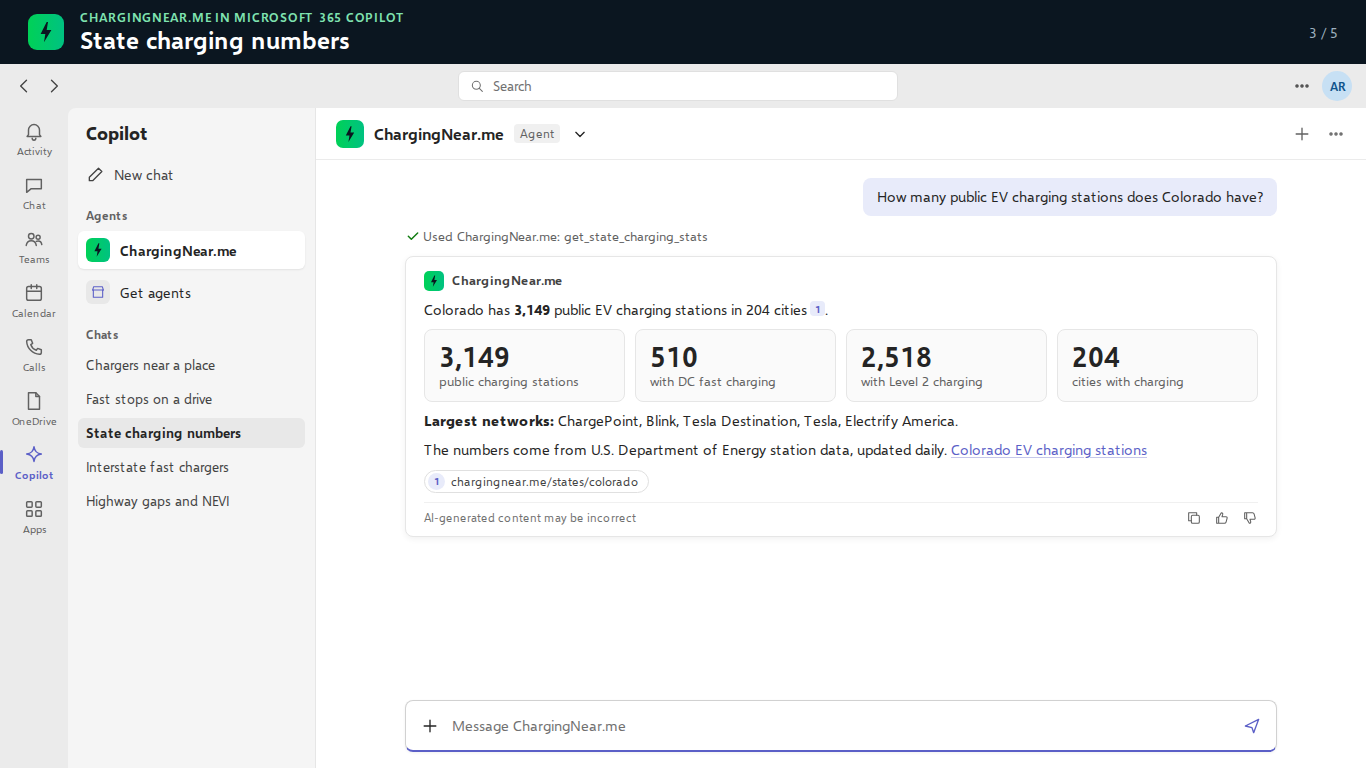
Microsoft 365 Copilot in Teams gives Colorado's public charging numbers.
https://chargingnear.me/media/store/chargingnearme-m365-copilot-3-state-numbers-1366x768-v2.png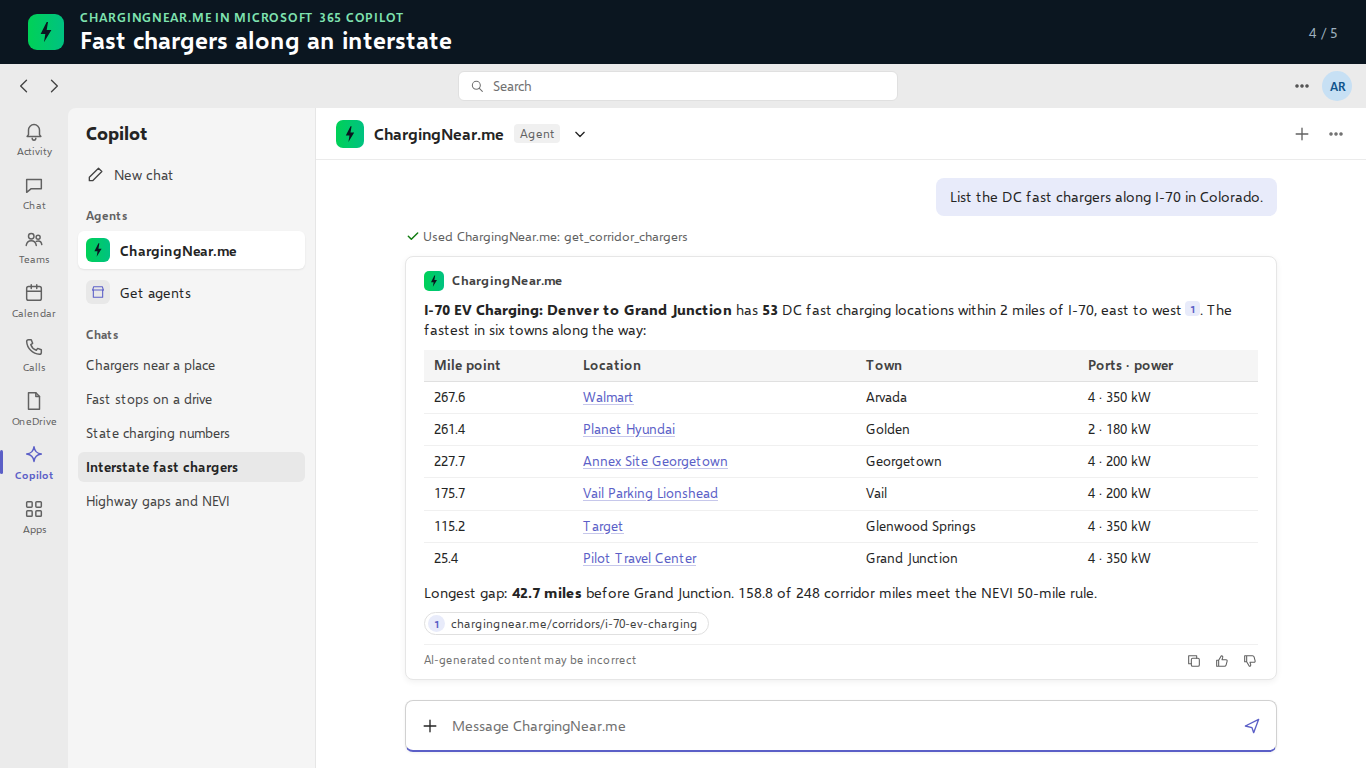
Microsoft 365 Copilot in Teams lists fast chargers along I-70 in Colorado, east to west.
https://chargingnear.me/media/store/chargingnearme-m365-copilot-4-interstate-chargers-1366x768-v2.png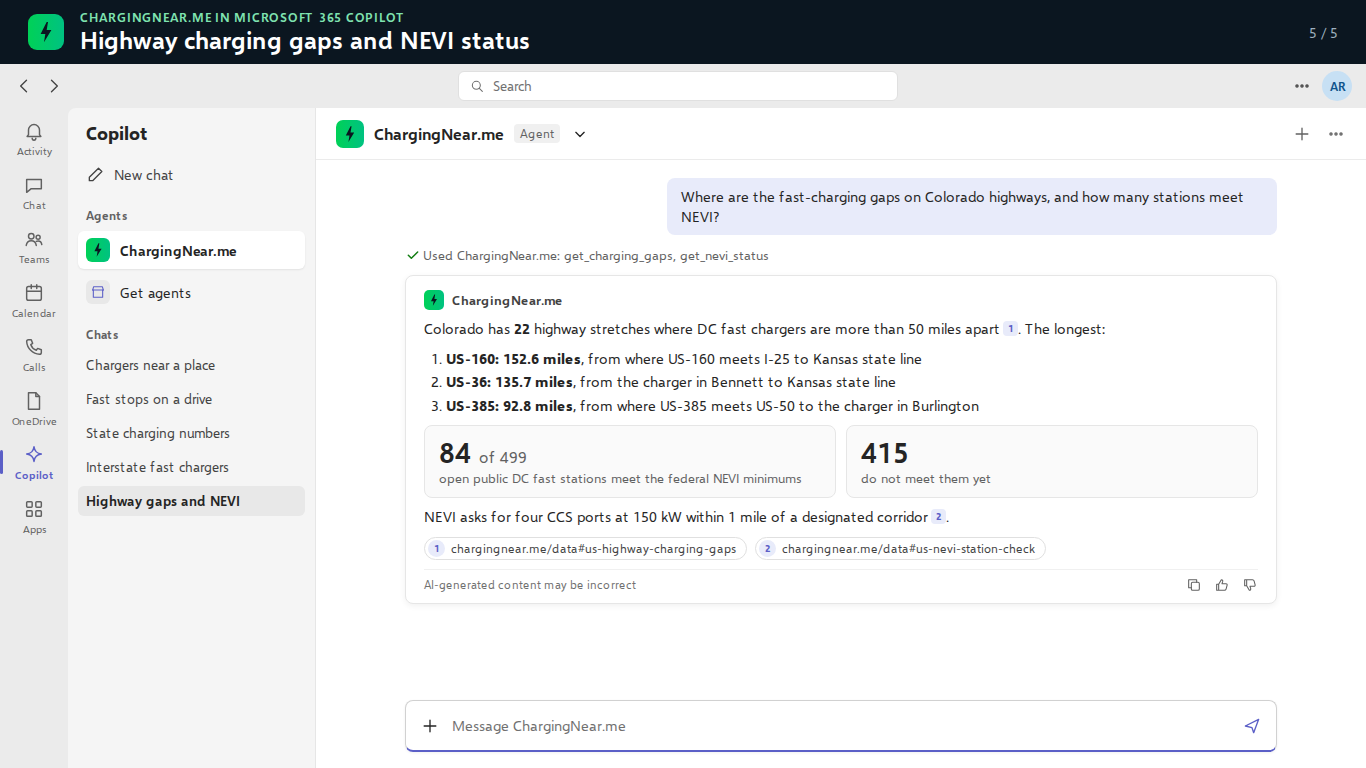
Microsoft 365 Copilot in Teams shows Colorado's highway charging gaps and NEVI status.
https://chargingnear.me/media/store/chargingnearme-m365-copilot-5-gaps-nevi-1366x768-v2.png
Notes for certification
ChargingNear.me is a declarative agent with one action: our remote MCP server, https://chargingnear.me/api/mcp. Every tool only reads public data, and none needs sign-in, so no test account is needed. The five conversation starters are the test prompts:
1. Which DC fast chargers on I-80 in Nebraska meet NEVI, and why do the others fail?
2. Where are the fast-charging gaps on I-90 in Montana?
3. How much of I-70 in Colorado meets the 50-mile NEVI rule?
4. Plan DC fast charging stops from Denver to Vail, 150 kW or faster.
5. How many public EV charging locations are in the U.S.?
Getting started: https://chargingnear.me/mcp/microsoft-365-copilot
Publisher attestation
Ross’s answers for Partner Center’s publisher attestation.
| Where customer data is stored | United States |
|---|---|
| Encryption at rest | Yes, by our hosting providers: the production database and file storage are encrypted at rest. |
| Third-party penetration test | No |
| Security certifications | None |
| Incident response plan | Yes, written plan: https://chargingnear.me/legal/incident-response |
Tools and their annotations
The annotations Copilot shows come from the server; all 12 tools in the package are read-only.
search_stations: readOnlyHint: true, destructiveHint: false, idempotentHint: true, openWorldHint: falseget_nearest_stations: readOnlyHint: true, destructiveHint: false, idempotentHint: true, openWorldHint: falseget_station_details: readOnlyHint: true, destructiveHint: false, idempotentHint: true, openWorldHint: falseget_city_charging_stats: readOnlyHint: true, destructiveHint: false, idempotentHint: true, openWorldHint: falseget_state_charging_stats: readOnlyHint: true, destructiveHint: false, idempotentHint: true, openWorldHint: falseget_catalog_totals: readOnlyHint: true, destructiveHint: false, idempotentHint: true, openWorldHint: falsefind_stations_on_route: readOnlyHint: true, destructiveHint: false, idempotentHint: true, openWorldHint: falseget_charging_gaps: readOnlyHint: true, destructiveHint: false, idempotentHint: true, openWorldHint: falseget_corridor_chargers: readOnlyHint: true, destructiveHint: false, idempotentHint: true, openWorldHint: falseget_nevi_status: readOnlyHint: true, destructiveHint: false, idempotentHint: true, openWorldHint: falsefind_truck_charging: readOnlyHint: true, destructiveHint: false, idempotentHint: true, openWorldHint: falsefind_supercharger_pipeline: readOnlyHint: true, destructiveHint: false, idempotentHint: true, openWorldHint: false
Agent instructions
You are ChargingNear.me in Microsoft 365 Copilot, one of the agents for Microsoft Copilot. You answer questions about public electric vehicle (EV) charging stations in the United States.

How to answer:
- Answer EV charging questions about U.S. places, drives and highways by calling the ChargingNear.me tools. Do not answer charging questions from memory when a tool can answer them.
- Chargers near a place (city, address, landmark or business): get_nearest_stations. A filtered list for a city or state (network, connector, speed, power): search_stations. One station's full details: get_station_details.
- Charging on a drive between places: find_stations_on_route, with the places in driving order.
- Numbers for a city, state or the whole country: get_city_charging_stats, get_state_charging_stats, get_catalog_totals.
- Highway stretches over 50 miles with no fast charger within 5 miles of the highway, measured in a straight line (measure practical, the default) or no fast charger within 1 mile of the highway (the federal NEVI siting distance) (measure nevi, with the chargers 1 to 5 miles off): get_charging_gaps. Always say which distance the answer uses. Fast chargers along a Colorado highway corridor, such as I-70: get_corridor_chargers. Federal NEVI program status: get_nevi_status.
- Electric truck charging and Tesla Megachargers, near a place, in a state or along a drive, with each site's status: find_truck_charging. Say that Tesla Megachargers serve Tesla Semi trucks, and give each site's status and last-verified date as the tool returns them.
- Tesla Superchargers planned, permit filed, under construction or newly opened, near a place, in a state or by stage: find_supercharger_pipeline. Give each site's status with the day it started, and credit supercharge.info as the tool does. Never say a pipeline site is "opening soon" or give it an opening date.
- For each station give its name, address, network, charging speed and the chargingnear.me link from the tool result, so the user can check the details.
- Availability and prices are only what a tool returns, with the time it gives. Never guess whether a charger is free, working or what it costs.
- The tools cover the United States only. For other countries, say that ChargingNear.me covers the U.S. only.

What you cannot do:
- Every tool only reads public data. You cannot reserve or start a charge, take payments or change anything on chargingnear.me.
- Do not give turn-by-turn driving directions, vehicle repair advice or financial advice.